Diferencia entre revisiones de «Flutter StatefulWidget. Eventos»
Ir a la navegación
Ir a la búsqueda
| Línea 112: | Línea 112: | ||
==GestureDetector== | ==GestureDetector== | ||
| − | + | * Más información en: | |
| + | :* https://api.flutter.dev/flutter/widgets/GestureDetector-class.html | ||
| + | :* https://flutter.dev/docs/development/ui/advanced/gestures | ||
| + | |||
| + | A diferencia del anterior Widget este: | ||
| + | :* No necesita tener un Widget ancestor de tipo Material. | ||
| + | :* No tiene el 'efecto visual' que tiene el InkWell cuando se produce el evento. | ||
| + | :* Tiene una mayor cantidad de eventos que podemos controlar, como deslizar los dedos sobre la pantalla,... | ||
| + | |||
| + | |||
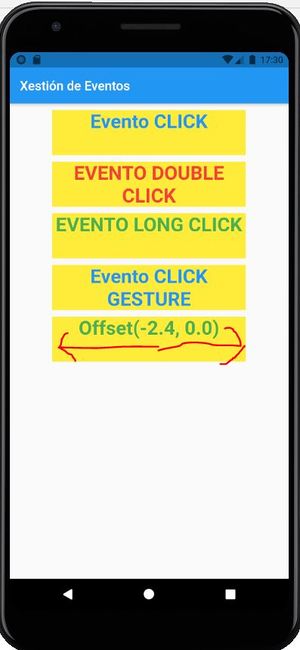
| + | * Modificaremos el ejemplo anterior para añadir dos contenedores que van gestionar el evento Click y el arrastrar el dedo sobre la pantalla en sentido horizontal. | ||
| + | |||
| + | [[Imagen:Flutter_dart_eventos_2.JPG|300px|center]] | ||
| + | |||
| + | |||
| + | :<syntaxhighlight lang="java" enclose="div" highlight="15,16,27,74-94" > | ||
| + | import 'package:flutter/material.dart'; | ||
| + | |||
| + | class EventosPage extends StatefulWidget { | ||
| + | const EventosPage({Key? key}) : super(key: key); | ||
| + | |||
| + | @override | ||
| + | _EventosPageState createState() => _EventosPageState(); | ||
| + | } | ||
| + | |||
| + | class _EventosPageState extends State<EventosPage> { | ||
| + | String _textoClick='Evento CLICK'; | ||
| + | String _textoDoubleClick = 'EVENTO DOUBLE CLICK'; | ||
| + | String _textoOnLongClick = 'EVENTO LONG CLICK'; | ||
| + | |||
| + | String _textoClickGesture = 'Evento CLICK GESTURE'; | ||
| + | String _textoDragGesture = 'Evento DRAG'; | ||
| + | |||
| + | @override | ||
| + | Widget build(BuildContext context) { | ||
| + | return Scaffold( | ||
| + | appBar: AppBar( | ||
| + | title: Text('Xestión de Eventos'), | ||
| + | ), | ||
| + | body: ListView( | ||
| + | children: [ | ||
| + | _eventosSobreInkWell(), | ||
| + | _eventosSobreGestureDetector(), | ||
| + | ], | ||
| + | ) | ||
| + | ); | ||
| + | } | ||
| + | |||
| + | Widget _eventosSobreInkWell(){ | ||
| + | |||
| + | return Column( | ||
| + | |||
| + | children: [ | ||
| + | InkWell( | ||
| + | child: _crearContainer(texto: '$_textoClick',color: Colors.blue, fondo: Colors.yellow), | ||
| + | onTap: () { | ||
| + | setState(() { | ||
| + | _textoClick = 'PULSASTE CON CLICK'; | ||
| + | }); | ||
| + | }, | ||
| + | ), | ||
| + | InkWell( | ||
| + | child: _crearContainer(texto: '$_textoDoubleClick',color: Colors.red, fondo: Colors.yellow), | ||
| + | onDoubleTap: () { | ||
| + | setState(() { | ||
| + | _textoDoubleClick = 'PULSASTE DOUBLE CLICK'; | ||
| + | }); | ||
| + | }, | ||
| + | ), | ||
| + | InkWell( | ||
| + | child: _crearContainer(texto: '$_textoOnLongClick',color: Colors.green, fondo: Colors.yellow), | ||
| + | onLongPress: () { | ||
| + | setState(() { | ||
| + | _textoOnLongClick = 'PULSASTE LONG CLICK'; | ||
| + | }); | ||
| + | }, | ||
| + | ), | ||
| + | ], | ||
| + | |||
| + | ); | ||
| + | |||
| + | } | ||
| + | |||
| + | |||
| + | Widget _eventosSobreGestureDetector(){ | ||
| + | |||
| + | return Column( | ||
| + | |||
| + | children: [ | ||
| + | GestureDetector( | ||
| + | child: _crearContainer(texto: '$_textoClickGesture',color: Colors.blue, fondo: Colors.yellow), | ||
| + | onTap: () { | ||
| + | setState(() { | ||
| + | _textoClick = 'PULSASTE CON CLICK'; | ||
| + | }); | ||
| + | }, | ||
| + | ), | ||
| + | GestureDetector( | ||
| + | child: _crearContainer(texto: '$_textoDragGesture',color: Colors.green, fondo: Colors.yellow), | ||
| + | onHorizontalDragUpdate: (detail){ | ||
| + | setState(() { | ||
| + | _textoDragGesture = detail.delta.toString(); | ||
| + | }); | ||
| + | }, | ||
| + | onLongPress: () { | ||
| + | setState(() { | ||
| + | _textoOnLongClick = 'PULSASTE LONG CLICK'; | ||
| + | }); | ||
| + | }, | ||
| + | ), | ||
| + | ], | ||
| + | |||
| + | ); | ||
| + | |||
| + | } | ||
| + | |||
| + | Widget _crearContainer({required String texto, required Color color, required Color fondo}) { | ||
| + | return Container( | ||
| + | margin: EdgeInsets.only(top:10), | ||
| + | height: 70, | ||
| + | width: 300, | ||
| + | color: fondo, | ||
| + | child: Text('$texto',textAlign: TextAlign.center,style: TextStyle(color: color,fontWeight: FontWeight.bold,fontSize: 30),), | ||
| + | ); | ||
| + | |||
| + | } | ||
| + | |||
| + | |||
| + | |||
| + | } | ||
| + | |||
| + | </syntaxhighlight> | ||
Revisión del 17:33 22 sep 2021
Introducción
- Ya vimos en la sección anterior de formularios como gestionar los diferentes eventos que se puedan producir en los elementos gráficos que conforman un formulario.
- Pero puede ser necesario que queramos gestionar algún evento sobre un Widget el cual no tenga asociado ninguna función de gestión de eventos sobre el mismo en su constructor.
- Veremos en este punto, cómo podemos implementar estos eventos.
- Creamos una nueva página en la carpeta pages de nombre eventos_page.dart
- En todas las páginas haremos lo mismo:
- Importamos la librería de 'material' (recordar que existe un snippet que lo hace automático).
- Creamos una clase (EventosPage) que derive de StatefulWidget. Se creará (si lo hacéis con un Snippet) una clase asociada que deriva de State.
- Modificamos la clase State y en su métod build hacemos que devuelva un Scaffold con una Appbar (hacerlo con un Snippet)
InkWell
- Más información en: https://api.flutter.dev/flutter/material/InkWell-class.html
- Nota: Para emplear este Widget es necesario que exista un Material Widget en alguno de sus ancestros en la jerarquía de Widget.
- Podéis consultar que eventos se pueden gestionar con este Widget en las propiedades del mismo que comienzan con onPPPPPPP.
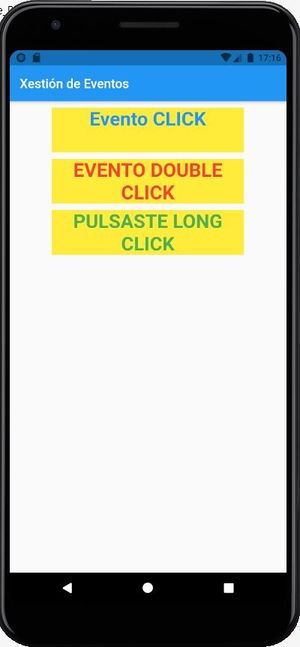
- En el siguiente ejemplo vamos a ver las que normalmente vais necesitar emplear, con el click (onTap) o doble click (onDoubleTap), mantener presionado (onLongPress).

import 'package:flutter/material.dart';

class EventosPage extends StatefulWidget {
  const EventosPage({Key? key}) : super(key: key);

  @override
  _EventosPageState createState() => _EventosPageState();
}

class _EventosPageState extends State<EventosPage> {
  String _textoClick='Evento CLICK';
  String _textoDoubleClick = 'EVENTO DOUBLE CLICK';
  String _textoOnLongClick = 'EVENTO LONG CLICK';

  @override
  Widget build(BuildContext context) {
    return Scaffold(
        appBar: AppBar(
          title: Text('Xestión de Eventos'),
        ),
        body: ListView(
                children: [
                  _eventosSobreInkWell()
               ],
        )
    );
  }

  Widget _eventosSobreInkWell(){

    return Column(

      children: [
        InkWell(
          child: _crearContainer(texto: '$_textoClick',color: Colors.blue, fondo: Colors.yellow),
          onTap: () {
            setState(() {
              _textoClick = 'PULSASTE CON CLICK';
            });
          },
        ),
        InkWell(
          child: _crearContainer(texto: '$_textoDoubleClick',color: Colors.red, fondo: Colors.yellow),
          onDoubleTap: () {
            setState(() {
              _textoDoubleClick = 'PULSASTE DOUBLE CLICK';
            });
          },
        ),
        InkWell(
          child: _crearContainer(texto: '$_textoOnLongClick',color: Colors.green, fondo: Colors.yellow),
          onLongPress: () {
            setState(() {
              _textoOnLongClick = 'PULSASTE LONG CLICK';
            });
          },
        ),
      ],

    );

  }

  Widget _crearContainer({required String texto, required Color color, required Color fondo}) {
    return Container(
      margin: EdgeInsets.only(top:10),
      height: 70,
      width: 300,
      color: fondo,
      child: Text('$texto',textAlign: TextAlign.center,style: TextStyle(color: color,fontWeight: FontWeight.bold,fontSize: 30),),
    );

  }
}
GestureDetector
- Más información en:
A diferencia del anterior Widget este:
- No necesita tener un Widget ancestor de tipo Material.
- No tiene el 'efecto visual' que tiene el InkWell cuando se produce el evento.
- Tiene una mayor cantidad de eventos que podemos controlar, como deslizar los dedos sobre la pantalla,...
- Modificaremos el ejemplo anterior para añadir dos contenedores que van gestionar el evento Click y el arrastrar el dedo sobre la pantalla en sentido horizontal.

import 'package:flutter/material.dart';

class EventosPage extends StatefulWidget {
  const EventosPage({Key? key}) : super(key: key);

  @override
  _EventosPageState createState() => _EventosPageState();
}

class _EventosPageState extends State<EventosPage> {
  String _textoClick='Evento CLICK';
  String _textoDoubleClick = 'EVENTO DOUBLE CLICK';
  String _textoOnLongClick = 'EVENTO LONG CLICK';

  String _textoClickGesture = 'Evento CLICK GESTURE';
  String _textoDragGesture = 'Evento DRAG';

  @override
  Widget build(BuildContext context) {
    return Scaffold(
        appBar: AppBar(
          title: Text('Xestión de Eventos'),
        ),
        body: ListView(
                children: [
                  _eventosSobreInkWell(),
                  _eventosSobreGestureDetector(),
               ],
        )
    );
  }

  Widget _eventosSobreInkWell(){

    return Column(

      children: [
        InkWell(
          child: _crearContainer(texto: '$_textoClick',color: Colors.blue, fondo: Colors.yellow),
          onTap: () {
            setState(() {
              _textoClick = 'PULSASTE CON CLICK';
            });
          },
        ),
        InkWell(
          child: _crearContainer(texto: '$_textoDoubleClick',color: Colors.red, fondo: Colors.yellow),
          onDoubleTap: () {
            setState(() {
              _textoDoubleClick = 'PULSASTE DOUBLE CLICK';
            });
          },
        ),
        InkWell(
          child: _crearContainer(texto: '$_textoOnLongClick',color: Colors.green, fondo: Colors.yellow),
          onLongPress: () {
            setState(() {
              _textoOnLongClick = 'PULSASTE LONG CLICK';
            });
          },
        ),
      ],

    );

  }


  Widget _eventosSobreGestureDetector(){

    return Column(

      children: [
        GestureDetector(
          child: _crearContainer(texto: '$_textoClickGesture',color: Colors.blue, fondo: Colors.yellow),
          onTap: () {
            setState(() {
              _textoClick = 'PULSASTE CON CLICK';
            });
          },
        ),
        GestureDetector(
          child: _crearContainer(texto: '$_textoDragGesture',color: Colors.green, fondo: Colors.yellow),
          onHorizontalDragUpdate: (detail){
            setState(() {
              _textoDragGesture = detail.delta.toString();
            });
          },
          onLongPress: () {
            setState(() {
              _textoOnLongClick = 'PULSASTE LONG CLICK';
            });
          },
        ),
      ],

    );

  }

  Widget _crearContainer({required String texto, required Color color, required Color fondo}) {
    return Container(
      margin: EdgeInsets.only(top:10),
      height: 70,
      width: 300,
      color: fondo,
      child: Text('$texto',textAlign: TextAlign.center,style: TextStyle(color: color,fontWeight: FontWeight.bold,fontSize: 30),),
    );

  }


}
