Archivo:Most-used-git-commands.gif
Archivo original (532 × 692 píxeles; tamaño de archivo: 82 KB; tipo MIME: image/jpeg)
Resumen
Fonte: https://www.linkedin.com/feed/update/urn:li:activity:7290226152827146241/
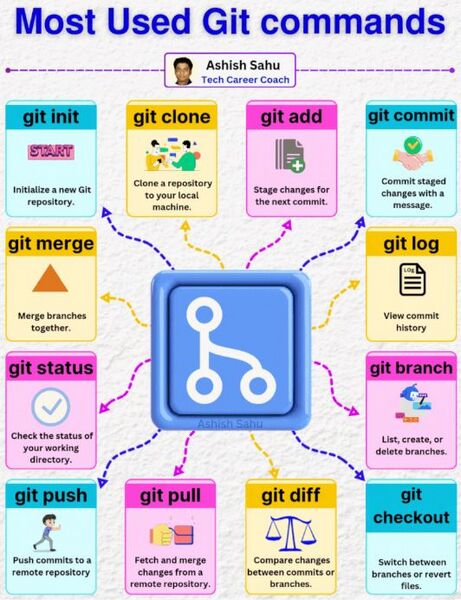
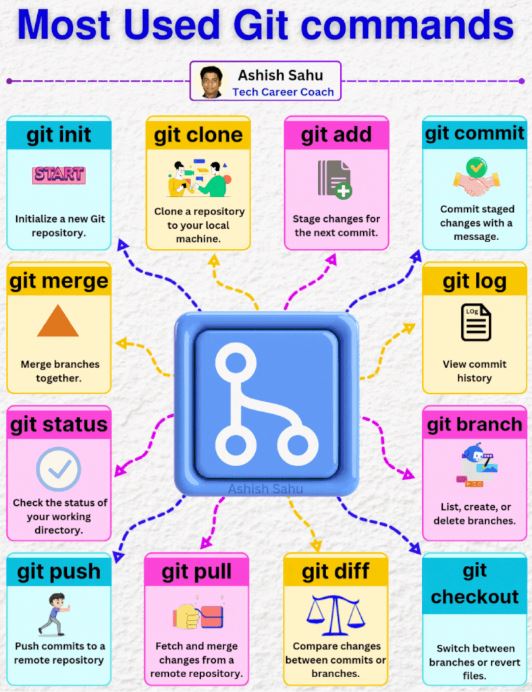
12 𝐦𝐨𝐬𝐭 𝐜𝐨𝐦𝐦𝐨𝐧 𝐆𝐢𝐭 𝐜𝐨𝐦𝐦𝐚𝐧𝐝𝐬
1. git init
Purpose: Initializes a new Git repository in your current directory. Usage: Run git init to start tracking your project with Git
2. git clone Purpose: Creates a copy of an existing repository on your local machine. Usage: Run git clone <repository_url> to download a repository.
3. git add Purpose: Stages changes in your working directory for the next commit. Usage: Use git add <file> or git add . to add all changes.
4. git commit Purpose: Commits staged changes to the repository with a descriptive message. Usage: Run git commit -m "Your message" to save your changes.
5. git status Purpose: Shows the status of changes in your working directory. Usage: git status lets you see which files are modified, staged, or untracked.
6. git push Purpose: Pushes your commits to a remote repository, like GitHub. Usage: Use git push origin <branch_name> to upload changes.
7. git pull Purpose: Fetches and merges updates from a remote repository. Usage: Run git pull origin <branch_name> to sync your local branch.
8. git branch Purpose: Manages branches within your repository. Usage: Use git branch to list branches or git branch <branch_name> to create a new one.
9. git checkout Purpose: Switches to a different branch or restores files. Usage: Run git checkout <branch_name> to switch branches or git checkout <file> to revert a file.
10. git merge Purpose: Merges one branch into another. Usage: Use git merge <branch_name> to integrate changes from one branch into the current branch.
11. git log Purpose: Displays the commit history. Usage: Run git log to see a list of past commits, along with their messages and details.
12. git diff Purpose: Shows the differences between commits, branches, or your working directory and the last commit. Usage: Use git diff to compare changes and git diff <commit1> <commit2> to see differences between two commits.
Here’s an extended list of useful Git commands beyond the common ones :
🚀𝐠𝐢𝐭 𝐟𝐞𝐭𝐜𝐡: Retrieve updates from a remote repository without merging.
🚀𝐠𝐢𝐭 𝐫𝐞𝐛𝐚𝐬𝐞: Apply commits on top of another base commit.
🚀𝐠𝐢𝐭 𝐫𝐞𝐬𝐞𝐭: Undo changes in the working directory or commit history.
🚀𝐠𝐢𝐭 𝐬𝐭𝐚𝐬𝐡: Temporarily save changes for later use.
🚀𝐠𝐢𝐭 𝐭𝐚𝐠: Mark specific points in history with a tag.
🚀𝐠𝐢𝐭 𝐫𝐞𝐦𝐨𝐭𝐞e: Manage remote repository connections.
🚀𝐠𝐢𝐭 𝐬𝐡𝐨𝐰: Show detailed information about a commit.
🚀𝐠𝐢𝐭 𝐫𝐞𝐯𝐞𝐫𝐭: Create a new commit that undoes a previous commit.
🚀𝐠𝐢𝐭 𝐛𝐥𝐚𝐦𝐞: Show who modified each line in a file.
🚀𝐠𝐢𝐭 𝐜𝐡𝐞𝐫𝐫𝐲-𝐩𝐢𝐜𝐤: Apply specific commits from another branch.
🚀𝐠𝐢𝐭 𝐫𝐦: Remove files from the working directory and staging area.
Credit - Ashish Sahu
Historial del archivo
Haz clic sobre una fecha y hora para ver el archivo tal como apareció en ese momento.
| Fecha y hora | Miniatura | Dimensiones | Usuario | Comentario | |
|---|---|---|---|---|---|
| actual | 20:41 14 feb 2025 | | 532 × 692 (82 KB) | Joselv (discusión | contribuciones) | Fonte: https://www.linkedin.com/feed/update/urn:li:activity:7290226152827146241/ 12 𝐦𝐨𝐬𝐭 𝐜𝐨𝐦𝐦𝐨𝐧 𝐆𝐢𝐭 𝐜𝐨𝐦𝐦𝐚𝐧𝐝𝐬 1. git init Purpose: Initializes a new Git repository in your current directory. Usage: Run git init to start tracking your project with Git 2. git clone Purpose: Creates a copy of an existing repository on your local machine. Usage: Run git clone <repository_url> to download a repository. 3. git add Purpose: Stages changes in your working directory for the next commit. Usage: Use g… |
No puedes sobrescribir este archivo.
Usos del archivo
La siguiente página usa este archivo: